AI Workflow Automation: Why ChatGPT Alone Isn’t Enough
What is AI Workflow Automation?
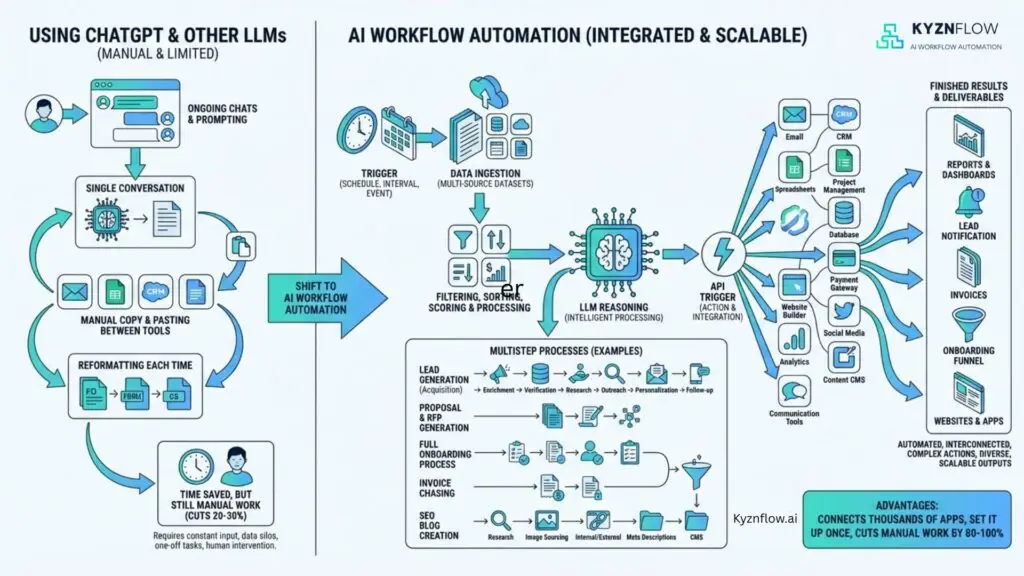
AI workflow automation connects multiple business tools to execute complete multi-step processes automatically. Unlike single-task automation, workflows handle entire sequences from trigger to completion across different platforms.
Workflow automation uses platforms like Make.com and n8n to link CRMs, communication tools, databases, and AI models. Each step triggers the next without manual intervention.
How Does AI Workflow Automation Differ from Using ChatGPT or Standard LLMs?
ChatGPT and other LLMs like Claude, DeepSeek, Grok or Gemini require ongoing manual prompting for each task. You copy data between tools, reformat outputs, and paste results into different systems repeatedly. This manual loop saves time but still requires constant human input and management.
AI workflow automation connects thousands of apps, platforms or tools as well as your data sets and documents – and executes complete processes automatically. Set it up once, then the workflows run continuously without prompting, copying, pasting, or reformatting. This cuts manual work by 80-100% instead of the usual 20-30% when only using a LLM.
Why Do Standard LLM Tools Create Data Silos?
Using ChatGPT alone creates isolated conversations without system integration. Every output needs manual copying into email, CRM, project management tools, or spreadsheets. Data sits in chat windows instead of living in business systems.
Workflow automation ingests data from multiple sources, processes it through AI reasoning, then automatically updates all connected systems. Reports go to dashboards, proposals land in CRM, tasks appear in your usual tools (i.e. ClickUp, Slack, Stripe, HubSpot etc) notifications fire off, all without human intervention.
What Business Problems Does AI Workflow Automation Solve?
AI workflow automation eliminates time-consuming multi-step processes like lead generation and qualification, automated prospect research, conversation intelligence and sales proposal generation automatically after you’ve finished a call, project kickoff coordination, content creation and distribution, and even chasing unpaid invoices.
Manual execution of these processes can easily waste anywhere from 10 – 20 hours per week, per team member, depending on the the task at hand and the tools they use. Setting up an AI Workflow system can handle all the repetitive admin and processing work. For example, if you think about all the steps required to send out a cold email campaign, from contact acquisition, waterfall enrichment, data cleaning, personalisation, lead scoring, content and outreach – all of this can actually be handed automatically once an AI workflow automation system is set up. You would only need to define the campaign each time – i.e. target CEOs, in California from B2B Cybersecurity companies – then the automation would run.
Why Can’t Standard SaaS Tools Handle Complete Workflows?
Standard SaaS tools force businesses to adapt processes to fit software limits. Each tool handles one function, leaving gaps between steps that require manual work.
AI workflow automation buildS around existing processes and tools. It fills gaps between systems and handles the manual steps that teams or tasks currently perform. In other words, its completely customised to your business environment, your processes, your tools etc rather than you having to change your processes to fit an external tool. For example, imagine if you didn’t have a CRM and then went to implement something like HubSpot or Salesforce, you would need to update your business processes to meet the standards and frameworks built by those tools. AI automation is more adaptable and can work around how you’ve already set things up (provided the correct logic and prompt engineering is built into the workflow).
What Is an AI-Powered Lead Generation System?
AI lead generation systems find prospects, enrich data, score leads, personalise outreach and nurture sequences automatically. The entire process runs from prospect identification to qualified lead without manual data entry.
Systems pull prospect data from multiple sources, score based on custom criteria, launch personalised email or LinkedIn outreach, and track engagement. Sales teams only see qualified leads ready for conversations. They would just get a Slack or Microsoft Teams notification when a a new prospect meeting is booked, and the notification will also have a briefing report on that prospect, based on information scraped from their company website, social media pages, reviews etc.
How Does Lead Generation Automation Compare to Clay?
Lead generation automation performs similar functions to Clay including data enrichment, scoring, and sequence triggering. But workflow automation extends beyond GTM (go-to-market) systems to handle proposal generation, research briefing reports, project management, and cross-system coordination.
Clay focuses specifically on go-to-market workflows. AI workflow automation covers complete business operations across sales, marketing, operations and finance.
There is also a significant learning curve and expense required with Clay. Apart from the cost of the Clay tool itself and the cost of the credits, you’d still need to hire for a “GTM Engineer” role and some companies even employ GTM Engineers as well as external Clay agencies. Total costs for this would be in the $180k-$300k range per year, whereas the ai automation route (using the correct mix of business and technical skillsets with the automations) would be more likely in the range of $20k-$50k per year. You can think of Clay as the Apple of GTM outbound (beautiful, expensive and walled-garden) whereas ai workflow automation using tools like n8n would be the Android/Linux version (cheaper, more flexible and more use cases).
What Is Automated Prospect Research?
Automated prospect research triggers when prospects book calls. Systems scrape LinkedIn profiles, company websites, recent news, TrustPilot reviews, and social media activity, then compile intelligence reports before meetings.
Calendar bookings trigger automatic research workflows. By meeting time, sales reps have detailed prospect intelligence including pain points, recent company activities and conversation starters.
Why Do Sales Teams Need Automated Prospect Research?
Manual prospect research consumes 30-60 minutes per call. Sales reps visit LinkedIn, Google company news, check review sites, and compile notes manually before conversations.
Automated prospect research eliminates research time while improving intelligence quality. Reps arrive prepared with insights gathered from dozens of sources automatically.
What Is Conversation Intelligence Automation?
Conversation intelligence automation transcribes meetings, classifies call types, extracts key points, generates tailored documents (like sales proposals, RFP responses, project plans, meeting notes etc), updates CRMs and manages follow-ups automatically. Think about it as having an automation that kicks off as soon as you’re finished with your Zoom, Teams or Google Meets call.
Similar to Gong or Chorus but connected to a complete workflow automation, systems don’t just analyse calls, they generate proposals , create project plans and update multiple business systems automatically.
How Does Call Classification Work in Conversation Intelligence?
AI analyses call transcripts to identify call types including sales discovery, product demos, contract negotiation, project kickoffs, support calls or any other types you define. Each call type triggers different workflow paths.
Sales calls generate proposals with pricing and terms. Project kickoffs create project plans, add tasks to your project management tool, and set up Slack or Teams channels. Support calls produce solution summaries and ticket updates. This means that the full follow up that normally takes hours after each call, can happen in just a few minutes.
What Is Automated SEO Content Generation?
Automated SEO content generation creates optimised blog posts from keywords through research, outline creation, writing, and publishing across multiple platforms. Complete content workflows run without writers.
Systems get keyword lists, set content variables, research topics using Perplexity AI, generate outlines, write full articles, format in Markdown, and publish to WordPress or Google Drive automatically.
How Does SEO Content Automation Research Topics?
Workflows use AI research tools like Perplexity to analyse top-ranking content, identify common themes, extract key statistics, and understand search intent for target keywords.
Research findings inform outline generation ensuring content covers topics searchers want. AI identifies gaps in existing content to create differentiated articles.
What Steps Does SEO Content Automation Execute?
Content automation gets keywords from spreadsheets, sets variables for tone and length, researches topics thoroughly, generates structured outlines, writes full articles section-by-section, adds internal links, formats with proper headings, and publishes directly to CMS platforms.
What marketing teams accomplish in weeks happens in 10 minutes. Content quality remains high through multi-step refinement and research integration.
What Is Automated Collections for Accounts Receivable?
Automated collections track payment due dates, identify overdue accounts, send escalating reminder sequences, log all communications, and continue follow-up until payment arrives. Collections happen automatically without awkward conversations.
First reminders stay friendly. Subsequent messages escalate urgency professionally. Workflows pause when payments process and resume if payments fail.
How Does Payment Reminder Automation Work?
Systems monitor invoice due dates in accounting software or CRMs. When invoices become overdue, automated email sequences begin with polite reminders that escalate in tone over time.
Workflows track all communications, log responses, update records when payments arrive, and resume collection efforts if payments fail. Finance teams recover revenue without manual follow-up work.
What Makes Automated Collections Work Well?
Consistent follow-up recovers more revenue than sporadic manual chasing. Automation sends reminders on exact schedules without forgetting accounts or delaying due to workload.
Professional, escalating message sequences maintain relationships while collecting payments. Teams recover revenue without dedicating hours to collections tasks.
What Is RAG for AI Knowledge Bases?
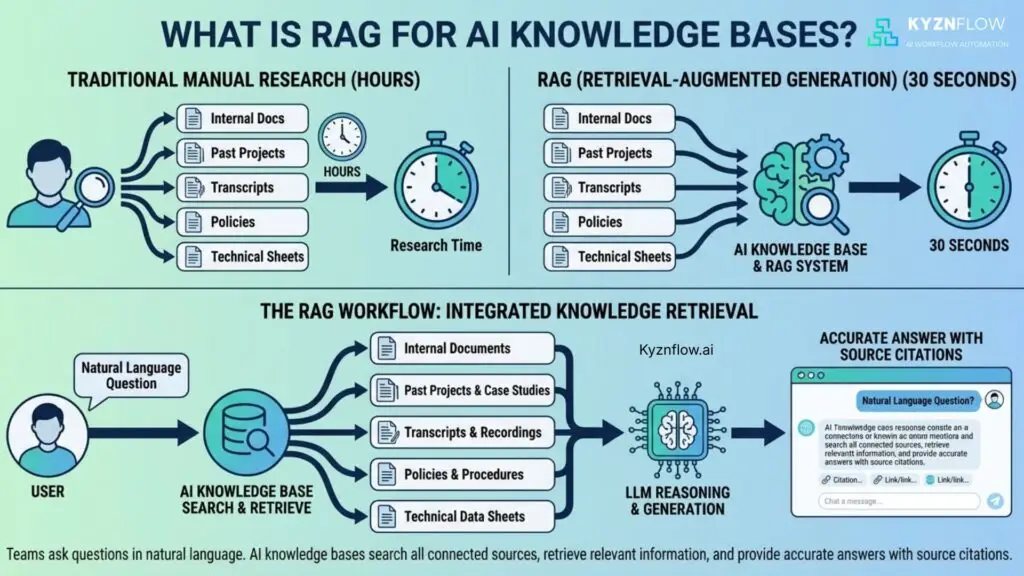
RAG (Retrieval-Augmented Generation) systems search internal documents, past projects, transcripts, policies, and technical sheets to answer specific questions. Research time drops from hours to 30 seconds.
Teams ask questions in natural language. AI knowledge bases search all connected sources, retrieve relevant information, and provide accurate answers with source citations.
How Do AI Knowledge Assistants Improve Team Speed?
AI knowledge bases eliminate time wasted hunting through file systems, shared drives, and email chains for specific information. Teams get instant answers to technical questions, policy details, and historical project information.
Customer success, sales, and operations teams access knowledge instantly. No more waiting for subject matter experts or digging through outdated wikis.
What Business Processes Can AI Workflows Fully Automate?
AI workflows fully automate lead generation and qualification, automated prospect research before meetings, conversation intelligence and proposal generation, project setup after deals close, content creation and distribution, automated collections, RFP response drafting, client onboarding sequences, and report generation from data sources.
Any process following consistent steps across multiple tools becomes automation candidates. Rules-based processes with clear decision points automate completely.
Why Do Businesses Need Multi-Step Workflow Automation?
Single-task automation leaves gaps requiring manual work between steps. Multi-step workflows eliminate entire processes, not just individual tasks.
Automating email sends but manually updating CRMs wastes time. Workflows that automatically research prospects, send emails, track responses, and update CRMs eliminate all manual work.
What Tools Power AI Workflow Automation?
Make.com and n8n are top workflow automation platforms. They connect 3000+ business tools including CRMs (Salesforce, HubSpot), communication platforms (Gmail, Slack), project management (ClickUp, Asana), calendar systems (Cal.com, Calendly), and AI models (OpenAI, Claude, Perplexity).
Platforms use visual workflow builders where each step connects to the next. No coding required for most workflows, though custom code is possible when needed.
How Do Workflow Platforms Connect Different Business Tools?
Platforms use APIs to connect tools and transfer data between them. When one step completes, it triggers the next step automatically passing relevant data forward.
Calendar bookings trigger research workflows. Research completion triggers report generation. Report delivery triggers CRM updates. Each step flows automatically into the next.
What Makes n8n and make.com Work Well for Business Automation?
N8n and make.com are no-code workflow automation tools that are used to build ai automation systems. n8n and make.com offer visual workflow builders, extensive tool integrations, AI model connections, conditional logic for decision-making, error handling and notifications, and unlimited complexity for sophisticated processes.
Unlike Zapier’s linear automation, Make.com and n8n handle complex branching logic, parallel processing, and sophisticated data transformation required for complete business processes. They are also a lot cheaper to use than Zapier.
Can AI Workflows Handle Complex Decision Logic?
Yes. Workflows include conditional branches, data analysis, pattern recognition, and context-based routing. AI evaluates situations and chooses appropriate paths automatically.
Call classification demonstrates complex logic: analyze transcript, identify call type, extract relevant information, route to appropriate workflow branch, generate type-specific output, and update multiple systems accordingly.
What Is the Difference Between AI Workflow Automation and RPA?
RPA (Robotic Process Automation) mimics human actions like clicking buttons and entering data. AI workflow automation uses APIs and intelligence to execute processes, make decisions, and generate content.
RPA breaks when interfaces change. AI workflows use stable API connections and adapt to context changes through intelligent processing.
How Does ABM Automation Work?
ABM (Account-Based Marketing) automation pulls LinkedIn and company data, creates personalised lead magnets based on prospect communication styles, and identifies decision-makers worth pursuing. It sends the right message to the right person in their preferred format.
Account intelligence automation makes personalisation work at scale. Systems analyze how prospects communicate and adapt outreach accordingly.
Why Is Account Intelligence Needed for ABM Success?
Personalising ABM outreach at scale manually is hard. Account intelligence automation researches targets, identifies patterns in their communication, and generates personalised content automatically.
Generic ABM messages get ignored. Intelligence-driven personalisation increases response rates by showing prospects you understand their specific situation.
How Long Does AI Workflow Automation Implementation Take?
Simple workflows including automated collections, email sequences, and basic data sync go live in 4-10 days. Complex workflows including conversation intelligence systems, lead generation platforms, and RAG implementations take 14-28 days.
Implementation time depends on workflow complexity, number of tool integrations, and custom logic requirements. Most businesses see ROI within 45 days.
What ROI Do Businesses See from Workflow Automation?
Typical clients recover 15-20 hours weekly per person through workflow automation. Saved time converts to more prospect conversations, faster deal cycles, and capacity for growth without hiring.
One automated lead generation system replacing 10 hours of weekly manual work saves 520 hours annually per person. At $50/hour, that’s $26,000 in saved labor costs plus increased output.
Why Choose Kyznflow for AI Workflow Automation?
Kyznflow bridges technical capabilities with business understanding. The team built sales teams, ABM programs, and lead scoring systems before AI tools existed, bringing real-world business context to automation design.
Many automation consultants understand technical connections but miss business nuances. Kyznflow understands what good looks like for revenue processes, not just how to connect APIs.
What Makes Kyznflow Different from Technical Automation Agencies?
Technical agencies often overcomplicate workflows, automate for automation’s sake, or miss business context and output quality requirements. Kyznflow comes from sales and marketing backgrounds, understanding process goals beyond technical implementation.
The team knows when automation helps versus when human touch remains your competitive advantage. Focus stays on measurable business outcomes, not impressive technical complexity.
Do Businesses Need Technical Teams to Use Kyznflow Workflows?
No. Workflows run automatically in the background while teams interact through existing tools like CRM, email, project management, and communication platforms. No n8n or Make.com interface management required.
When adjustments are needed like updating email templates or changing scoring criteria, Kyznflow handles modifications. Teams don’t manage technical workflow platforms directly.
What Support Does Kyznflow Provide After Implementation?
Ongoing support includes performance monitoring, workflow optimisation, troubleshooting, prompt engineering adjustments, and adapting workflows to new tools or requirements. Support extends beyond initial implementation.
First 30 days after go-live include all issues, bugs, and adjustments in project scope. After 30 days, logic errors get fixed at no cost while external API changes fall under support packages.
How Much Does AI Workflow Automation Cost?
Project-based pricing or retainer fees depend on automated processes, tool integrations, and workflow complexity. Most businesses need multiple processes automated, making retainers more cost-effective than individual projects.
Free audits identify high-impact automation opportunities with transparent cost estimates and projected ROI. Most automations pay for themselves within 90 days through time savings and gains.
What Performance Guarantee Does Kyznflow Offer?
Initial pilot projects include performance-based guarantees: if agreed-upon measurable gains aren’t achieved within 45 days, service fees for that pilot are waived. Performance commitments back all implementations.
New agencies earn trust through results. Client success determines Kyznflow success, creating aligned incentives.
What Common Mistakes Do Businesses Make with Workflow Automation?
Businesses often automate wrong processes first, over-engineer simple workflows, ignore user experience in automated outputs, fail to monitor and optimise after launch, and choose tools before understanding requirements.
Starting with highest-ROI processes, keeping workflows as simple as possible, and maintaining output quality drives success. Technical capability matters less than business impact.
Which Processes Should Businesses Automate First?
Automate high-frequency, time-consuming processes with clear rules first. Lead qualification, proposal generation, client onboarding, and payment reminders deliver fast ROI through immediate time savings.
Processes consuming 5+ hours weekly with consistent steps make ideal first automation targets. Quick wins build momentum for larger automation initiatives.
How Do Businesses Measure Workflow Automation Success?
Success metrics include time saved per process execution, error reduction rates, process completion speed, team capacity increase, and revenue impact from gains. Measurable KPIs track automation performance.
Before/after comparisons quantify impact. If proposals took 2 hours manually and now take 5 minutes, that’s 1 hour 55 minutes saved per proposal measurable directly.
Can AI Workflows Replace Go-to-Market Tools Like Clay?
AI workflows can replicate Clay-style GTM functionality including data enrichment, lead scoring, sequence triggering, and multi-channel outreach. But workflows extend beyond GTM to handle operations, finance, and project management.
Rather than replacing tools, workflows connect and improve them. Workflows pull data from existing CRMs, add intelligence, execute actions, and update records automatically.
What Makes AI Workflow Automation Future-Proof?
Workflow platforms evolve continuously, adding new tool integrations and AI model connections. As new tools emerge, workflows adapt by connecting them rather than requiring platform replacement.
API-based connections remain stable even as individual tools update interfaces. Workflows don’t break from visual changes affecting RPA systems.
How Do Workflows Handle Errors and Failures?
Every workflow includes error handlers notifying teams immediately when steps fail. Error handlers cover API rate limits, timeout issues, data formatting problems, and authentication failures.
Notifications specify exact failure points. Teams address issues quickly before processes backup. Most workflows include retry logic for temporary failures.
What Security Considerations Apply to Workflow Automation?
Workflow platforms like Make.com and n8n use encrypted connections, OAuth authentication, and SOC2 compliance for data protection. No credentials stored in plain text or workflows themselves.
API keys and tokens store securely in platform credential managers. Data transfers use HTTPS encryption. Compliance covers GDPR, HIPAA when required, and regional data regulations.
Can Workflows Integrate with Custom Internal Tools?
Yes. Any tool with an API or webhook capability connects to workflow platforms. Custom internal databases, proprietary software, and legacy systems integrate through API connections or custom code modules.
For tools without APIs, workarounds include email parsing, file watching, or database queries. Creative solutions connect even difficult systems.
What Is Revenue Operations Automation?
Revenue operations automation connects sales, marketing, and customer success systems to eliminate manual data transfer and process gaps. Complete revenue lifecycle workflows run automatically across departments.
RevOps automation ensures data consistency, eliminates process bottlenecks, and provides unified visibility into customer journeys from first touch to renewal.
How Do Businesses Get Started with AI Workflow Automation?
Book a 30-minute audit call to identify most time-consuming processes. Consultants analyze workflows, identify automation opportunities, prioritize by ROI, provide fixed-timeline roadmaps, and deliver measurable projections.
Most businesses start with one high-impact workflow, measure results, then expand to additional processes. Iterative approach minimises risk while proving value quickly.